
From PCB antenna to 50 ΩPCB antenna simulation and Smith chart matching software for Windows
One Windows program made by RF engineers for RF engineers: simulate your printed antenna in PCB Antenna Lab, then build the matching network in SmithMatch with parts you already have on the bench.
Buy a licence See the prices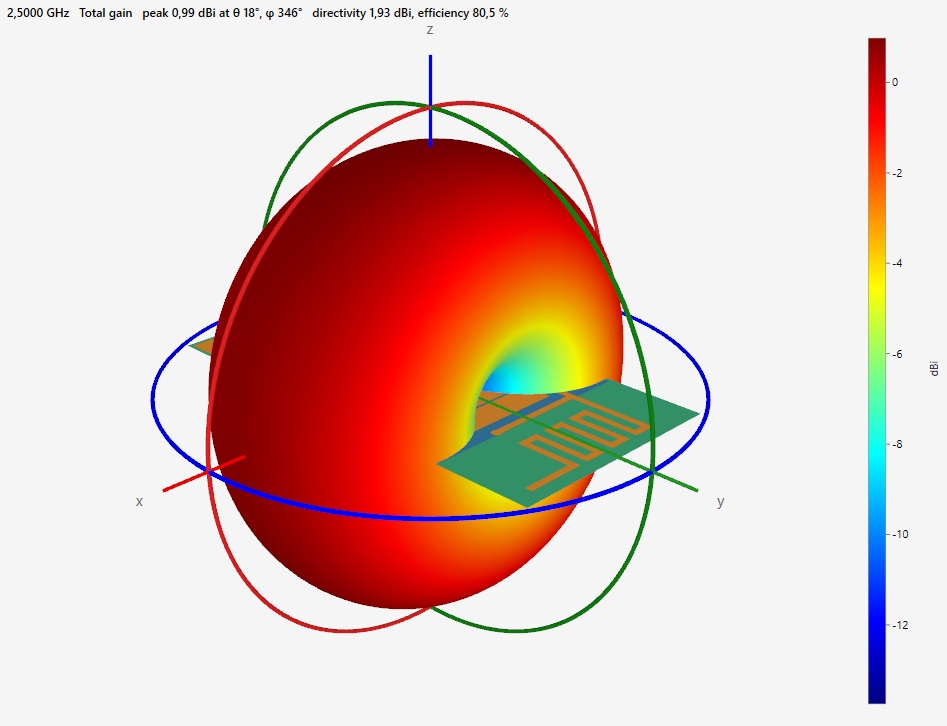
PCB Antenna Lab
Parametric IFA, MIFA or any planar antennas on any multi-layer stackup, simulated with the open-source openEMS FDTD solver.
- S11, impedance, VSWR and Smith chart
- 2D and 3D radiation patterns, current distribution
- Import KiCad, Eagle, Fusion 360, Altium and Gerber boards, MATLAB pcbStack
- Export KiCad, Eagle and Altium footprints
SmithMatch
Design the matching network of your antenna on an interactive Smith chart, with the values of the Würth Elektronik design kits.
- Place L and C with the mouse, tune with a slider
- Auto-match: every L-network solution
- Takes the simulated antenna impedance as its start
- VSWR sweep and printed reports
From the simulation to the fix
Every result is a clue: what is wrong, where it comes from, and what to change.
See where your antenna resonates
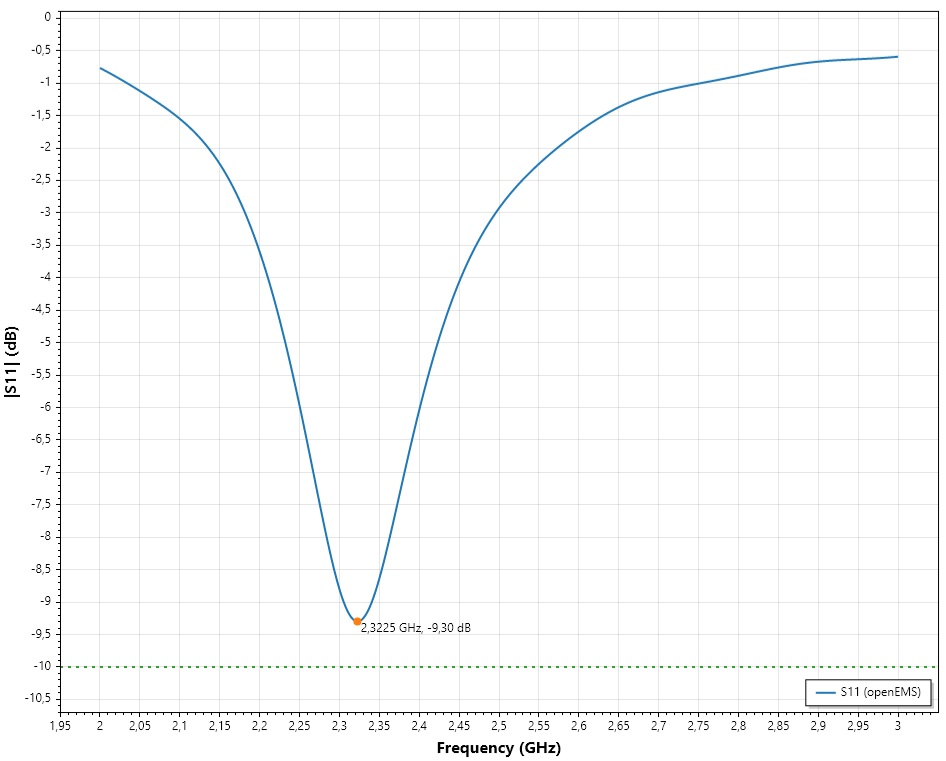
The S11 curve shows how much power the antenna reflects at each frequency. The program marks the lowest point, here 2.32 GHz at −9.3 dB, and draws the −10 dB line so you see at once whether the antenna is matched, and how wide the band is.
It is simulated on your real board and stackup with openEMS, not estimated from a formula. If you have a VNA measurement (.s1p), you can plot it on the same curve.
Read the impedance behind the S11
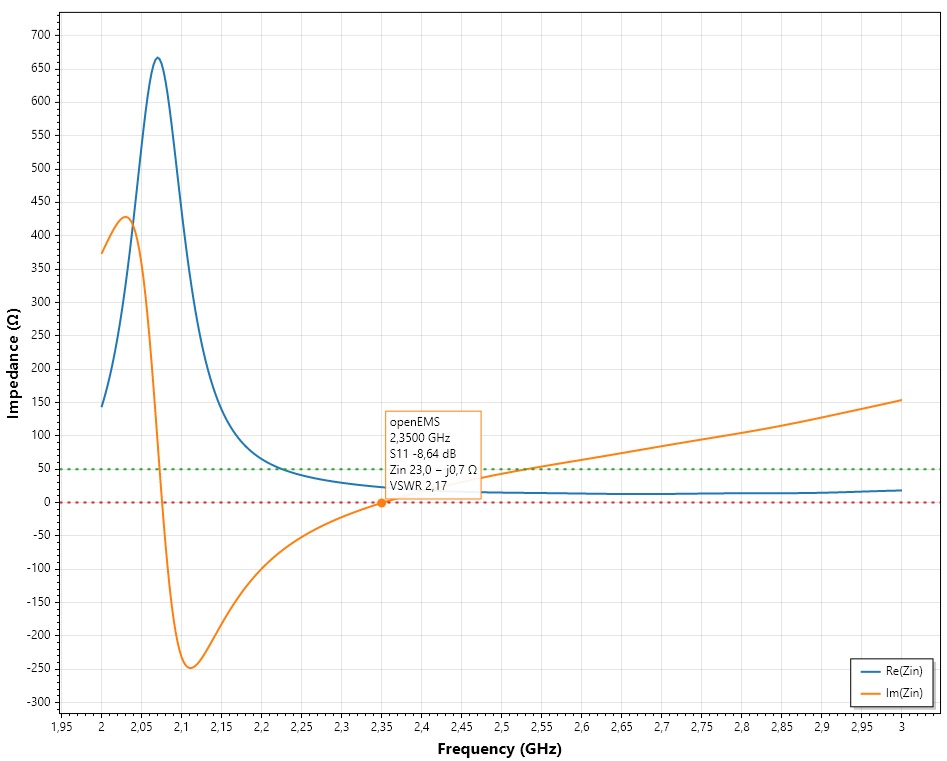
S11 tells you that the match is bad; the impedance tells you why. The real part and the imaginary part of Zin are plotted over frequency, with the 50 Ω and 0 Ω reference lines. Click a point to read S11, Zin and VSWR.
Here the real part is about 23 Ω and the reactance is close to zero at 2.35 GHz: the antenna is resonant but its resistance is too low. That is a clue for the next step.
Watch the match on the Smith chart
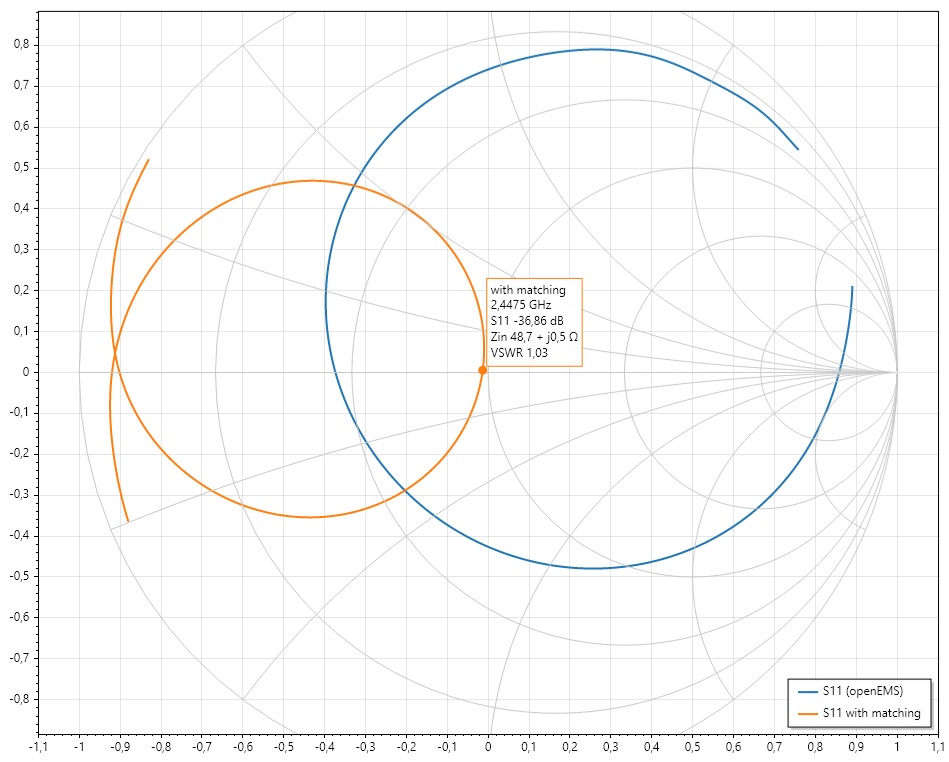
The blue curve is the simulated antenna on the Smith chart. The orange curve is the same antenna after the matching network: the curve is moved to the centre, which is 50 Ω. A click gives the frequency, S11, impedance and VSWR (here 36.9 dB return loss at 2.45 GHz).
You see how every part you add moves the impedance, so you learn what the network does, not only the final numbers.
Get a matching network with parts from the bench
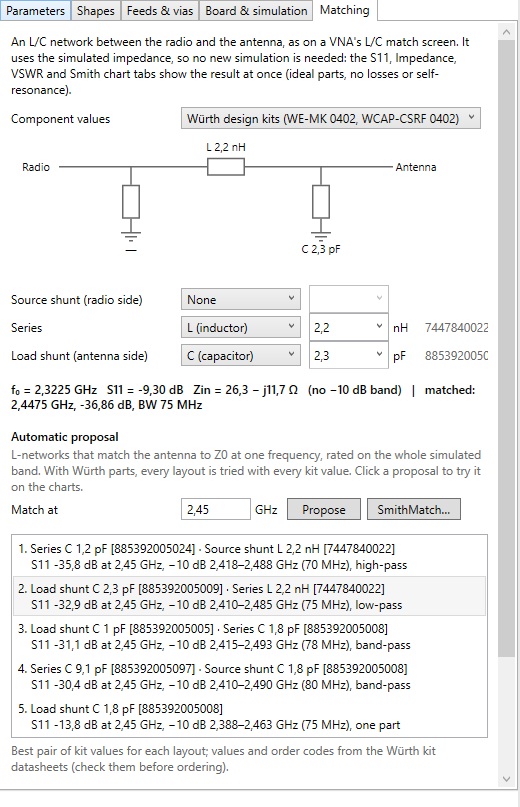
Pick a layout (series and shunt L or C) and the values from the Würth Elektronik design kits, and the S11, impedance, VSWR and Smith chart tabs update at once, using the simulated impedance. No new simulation is needed.
Press Propose and the program tries every layout with every kit value, rates each on the whole band, and lists the best ones with their order codes. Click a proposal to see it on the charts.
Know where the energy goes
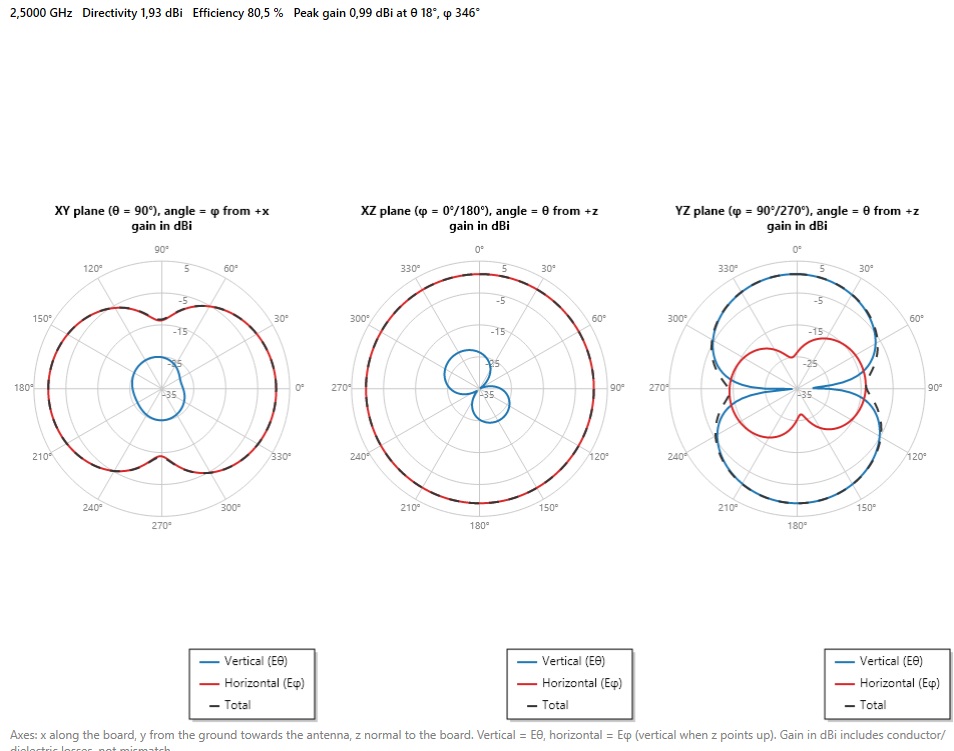
The radiation pattern is shown in the three principal planes, in dBi, for vertical and horizontal polarization and the total. The header gives directivity, efficiency and peak gain (here 1.93 dBi, 80.5 % and 0.99 dBi).
It also shows how the board itself shapes the pattern, which is how you find out that a nice-looking antenna radiates into the wrong direction.
See it in 3D, on your board
The same pattern as a 3D shape, drawn around your board so you can turn it and check the main lobe against the way the product will be held or mounted. The colour scale is the gain in dBi.
Find out which copper is radiating
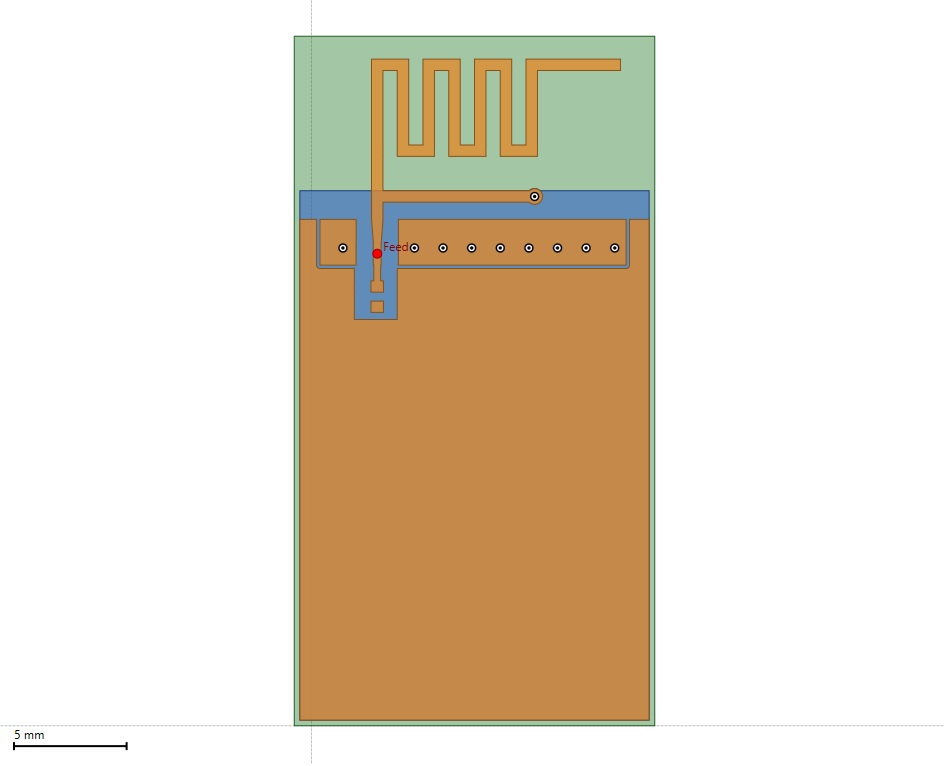
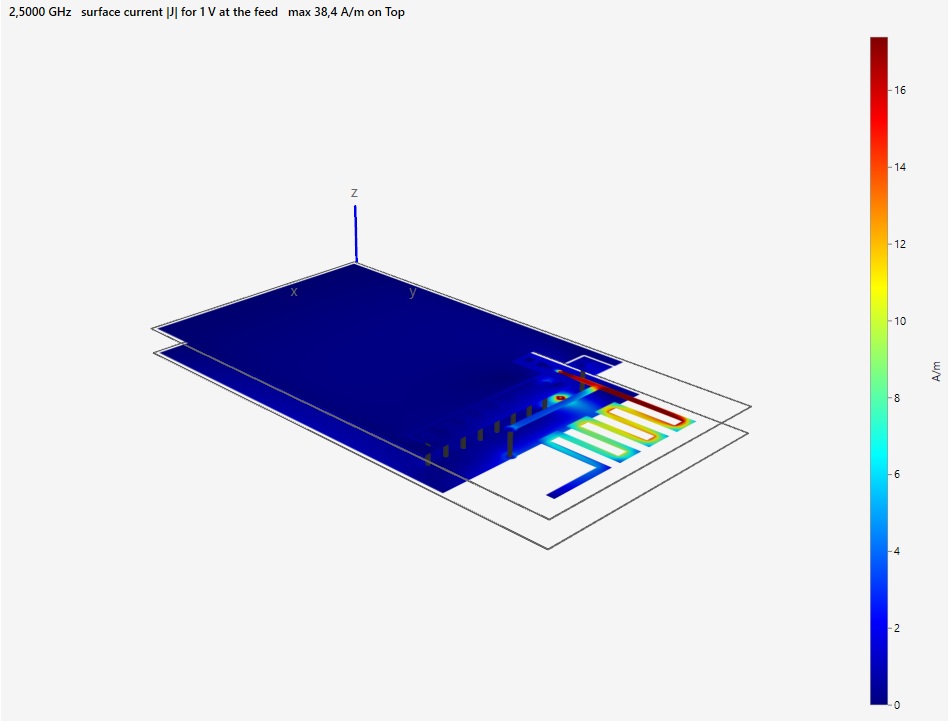
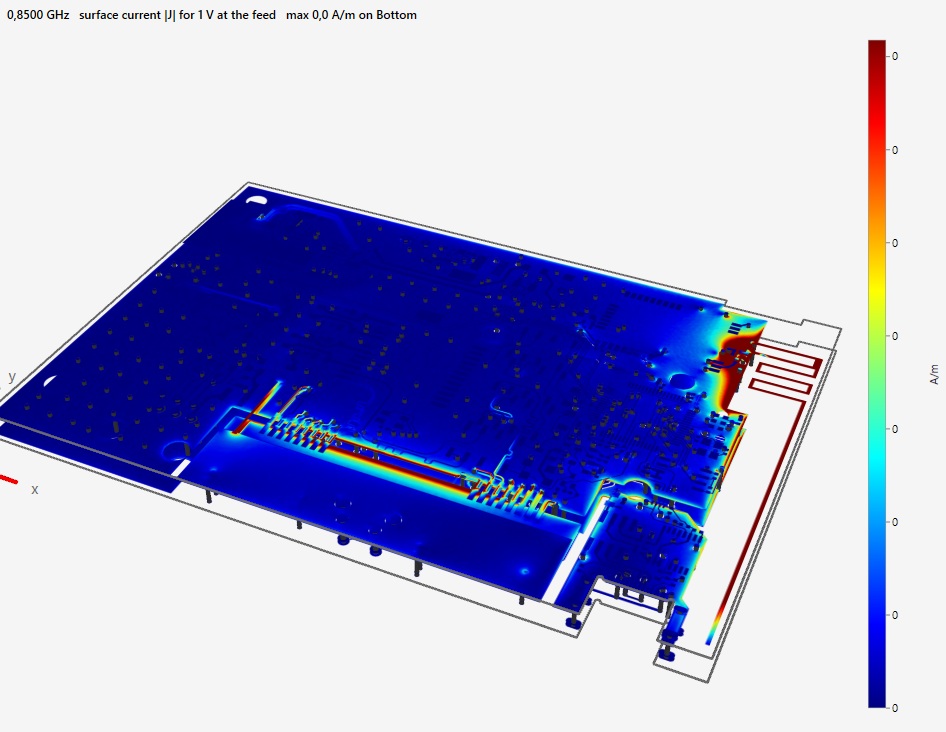
The surface current on every copper layer, at the frequency you choose, shows where the antenna really works: the meander, the feed and the edge of the ground plane. Strong current where you did not expect it is a clue to a bad ground, a nearby trace or a missing clearance.
It works on a full product board too, not only on the antenna itself.
Simulate the real board, not only the antenna
Import the complete board of your product (KiCad, Eagle, Fusion 360, Altium or Gerber) and simulate it as it is: hundreds of components and vias, the ground planes, the cut-outs and the cables' attachment points, with the antenna in its real surroundings.
The picture shows the surface current on a complete product board at 868 MHz. You see how the current flows from the antenna into the ground and along the board, which is what decides the real efficiency and pattern, and what a simulation of the antenna alone cannot tell you.
Download and try
LW RF Studio starts with 30 days of the full version on every PC. A licence unlocks it on your PC.
Download LW RF Studio